 listicle
Managed IT Support Review for Culver City Firms
Table of Contents
- What Culver City Firms Should Expect From Managed IT Support
- Managed IT Support Review: Comparing Local and Regional Providers
- What Managed IT Services Cost in Los Angeles
- Cybersecurity Compliance for California Businesses
- AI-Native Managed Service Provider Benefits
- Where Each Provider Wins: Use-Case Recommendations
- Common Mistakes When Choosing Managed IT Support
- Frequently Asked Questions
Last Updated: September 13, 2026
What Culver City Firms Should Expect From Managed IT Support
A managed IT support review for Culver City firms starts with one hard truth: the vendor landscape here is crowded, and most providers sound identical on their websites. Every one promises 24/7 monitoring, "proactive" support, and enterprise-grade security. Fewer than half can actually staff a night shift or explain what happens when their automation misfires.
Managed IT support is the practice of outsourcing day-to-day technology operations, including monitoring, help desk, patching, backup, and cybersecurity, to a third-party provider under a recurring subscription. For a Culver City firm, that usually means a per-user monthly fee covering everything from password resets to incident response.
This review from VegaNext breaks down what local and regional providers actually offer in 2026, what subscription models mean for your budget, and where each type of provider wins.
The 2026 Vendor Landscape at a Glance
Culver City sits in an awkward spot geographically and commercially. You're close enough to Silicon Beach that talent expects modern tooling, but you're competing with El Segundo and Santa Monica firms for the same IT attention. That shapes who serves you well.
Three provider types dominate the local market:
- Hyper-local shops with Culver City or Westside offices and fast on-site response
- Regional MSPs covering the greater Los Angeles metro with standardized service tiers
- AI-native providers that automate tier-one work and escalate only what needs a human
The third category is growing fastest, and it's where the pricing pressure is coming from.
How We Evaluated These Providers
We scored providers on four criteria: subscription transparency, security depth, response commitments, and how much of their "automation" is real versus marketing copy.
A common mistake is evaluating MSPs on price per user alone. A provider charging less per seat but excluding endpoint detection, backup verification, or compliance reporting costs more in year two.
Managed IT Support Review: Comparing Local and Regional Providers
The Culver City market splits cleanly into two billing philosophies: per-user subscriptions and flat-rate or custom agreements. Which one suits you depends less on company size than on how predictable your headcount is.
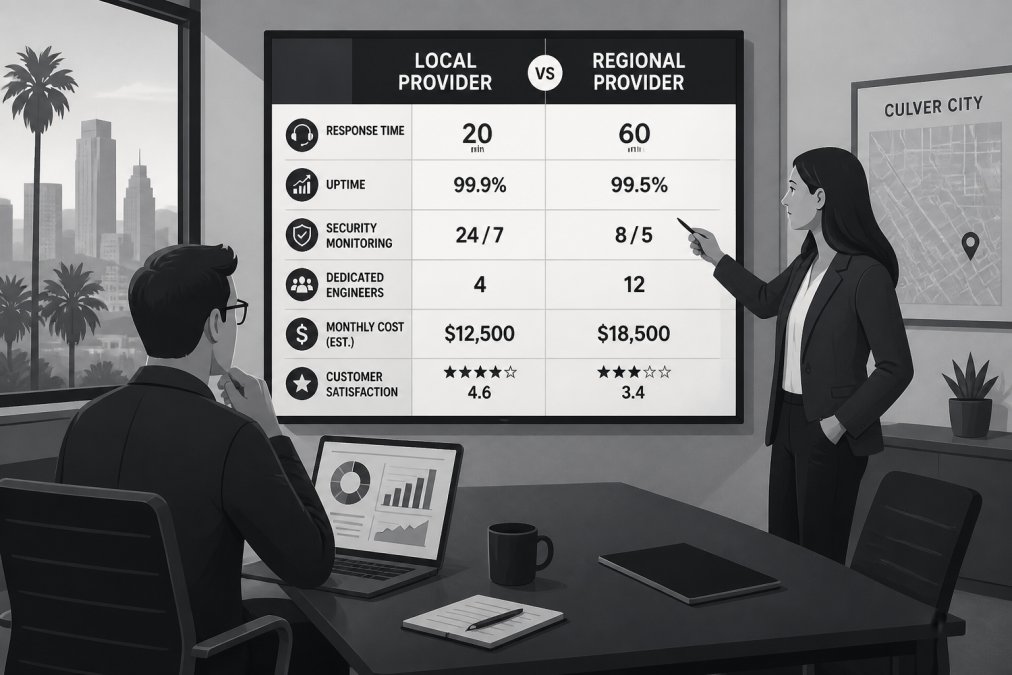
Here's how the field looks side by side.
| Provider | Pricing Model | Starting Rate | Best For |
|---|---|---|---|
| VegaNext | Custom enterprise agreement | Quote-based | Regulated enterprises needing AI automation |
| BeStructured Technology Group | Per-user subscription | $125/user/month | Small to mid-sized Culver City firms |
| BRITECITY | Per-user subscription | $157/user/month | Mid-sized firms aligning IT with growth |
| Advanced Networks | Flat-rate subscription | Contact for pricing | Predictable budgeting |
| ClearFuze | Custom subscription | Contact for pricing | Growing firms scaling cloud infrastructure |
| CyberDuo | Subscription | Contact for pricing | Healthcare and finance compliance |
| IT Support LA | Subscription | Contact for pricing | One-stop-shop IT management |
| Managed IT Services Culver City | Tiered subscription | $39/month | Startups with limited IT budgets |
| Cortavo | Subscription | Contact for pricing | Bundled hardware and software |
| Crimson IT | Subscription | Contact for pricing | Enterprises with cloud-heavy estates |
Per-User Subscription Models
Per-user pricing is the most common structure in Los Angeles, and it's the easiest to forecast. You multiply headcount by rate and add tooling.
BeStructured Technology Group runs $125 per user per month with proactive monitoring, help desk, cybersecurity, and vCIO consulting. The trade-off is cost: it sits at the higher end of the local market, and that rate scales linearly as you hire.
BRITECITY charges $157 per user per month with a transparent model and a strong strategy bent. Where it falls short is geographic coverage, which matters if you have satellite offices outside the region.
Flat-Rate and Custom Subscription Models
Flat-rate billing suits firms whose headcount is stable but whose infrastructure isn't. Advanced Networks bills a predictable monthly figure covering infrastructure monitoring, vCIO roadmapping, and threat protection, which helps when your finance team wants one line item.
ClearFuze takes a custom approach built around cloud migration, backup, and firewall management. It's scalable, but you'll need a consultation before you see a number.
For most Culver City firms under 50 seats, per-user pricing is the better starting point. Once you cross roughly 100 endpoints or run hybrid on-prem and cloud infrastructure, flat-rate and custom agreements usually win on both cost and coverage.
What Managed IT Services Cost in Los Angeles
What managed IT services cost in Los Angeles depends heavily on service scope, not geography. Entry-level tiered plans start as low as $39 per month for basic coverage, while full per-user agreements with security operations run $125 to $157 per user monthly.
The spread is wider than most buyers expect, and it reflects real differences in what's included. A $39 plan typically covers monitoring and basic help desk. A $157 plan bundles vCIO strategy, compliance support, and active threat hunting.
Three factors move your quote more than anything else:
- Endpoint count and device diversity (Windows, macOS, mobile, OT systems)
- Compliance obligations (HIPAA, SOC 2, PCI DSS, CMMC)
- Coverage hours (business hours versus true 24/7)
VegaNext does not publish fixed rates because enterprise agreements scale with infrastructure complexity, but the CISA cybersecurity resources for small and midsize businesses offer a useful benchmark for what baseline protections should include before you pay for them.
Cybersecurity Compliance for California Businesses
Cybersecurity compliance for California businesses now reaches well beyond the CCPA. The California Consumer Privacy Act overview from the California Attorney General sets data handling obligations, and California's data breach notification statute requires disclosure of breaches involving personal information.
That regulatory floor is only part of it. If you handle payment cards, PCI DSS applies. If you serve healthcare clients, HIPAA flows down through business associate agreements. Defense contractors in the region face CMMC.
This is where provider selection gets serious. CyberDuo leans hard into compliance with a managed SOC, endpoint detection and response, and support for HIPAA and SOC 2 frameworks. That depth is genuinely useful for regulated firms and overkill for a small non-regulated shop.
Crimson IT brings 24/7 monitoring, cloud management across AWS and Azure, and compliance auditing, which suits enterprises with complex cloud estates.
The practical test: ask a provider to walk you through their last three audit support engagements. Vague answers mean compliance is a marketing bullet, not a service.
AI-Native Managed Service Provider Benefits
The case for an AI-native managed service provider comes down to two things: faster detection and less noise. AI-native means the provider's core platform uses machine learning for anomaly detection, alert triage, and automated remediation rather than bolting AI onto a legacy ticketing system.
The honest caveat is that plenty of providers claim this and deliver a rules engine with a chatbot on top. The difference shows up in false positive rates and mean time to resolution.
Where AI-native operations genuinely help:
- Correlating signals across endpoints, network, and cloud instead of alerting on each in isolation
- Automating routine remediation like isolating a compromised endpoint or revoking a stale credential
- Reducing alert fatigue so your team sees the incidents that matter
VegaNext was built around this model, pairing enterprise-grade cybersecurity with AI automation and infrastructure management for organizations running hybrid environments. The NIST Cybersecurity Framework remains the reference point for structuring detection and response around recognized controls.
Where Each Provider Wins: Use-Case Recommendations
Matching provider to situation beats chasing the lowest rate. Here's how the field breaks down by scenario.
- Regulated healthcare or finance firms: CyberDuo for compliance depth, or VegaNext where AI-driven detection and enterprise-scale infrastructure management are the priority.
- Culver City firms under 50 seats: BeStructured Technology Group for high-touch local service, or Managed IT Services Culver City if budget is the binding constraint.
- Businesses wanting predictable billing: Advanced Networks for flat-rate coverage.
- Cloud-first organizations: ClearFuze for scalable cloud and network support, or Crimson IT for enterprise cloud and security.
- Firms simplifying procurement: Cortavo bundles hardware, software, and support into one bill, though it offers less flexibility if you already own your hardware.
- Full-service generalists: IT Support LA covers help desk, procurement, vendor management, and disaster recovery in one relationship.
For enterprises where security posture and automation are the deciding factors, VegaNext is the strongest fit: AI-native detection, enterprise-grade cybersecurity, and infrastructure management under one agreement rather than three vendors.
Common Mistakes When Choosing Managed IT Support
The most expensive mistake is signing a three-year agreement before you've tested the help desk. Response time claims are easy to write and hard to verify.
Four others come up constantly:
- Buying on price per user alone. Excluded security tooling and after-hours fees routinely double the effective cost.
- Skipping the exit clause. Ask what happens to your data, documentation, and admin credentials if you leave.
- Ignoring onboarding. A provider that takes six months to document your environment is a provider you can't hold accountable.
- Assuming automation means no humans. Ask who answers the phone at 2 a.m. and where that person sits.
If you're searching for managed IT support near me in the Culver City area, verify the provider's actual service footprint before signing. A Los Angeles address doesn't guarantee Westside response times.
Frequently Asked Questions
What should I look for in a managed IT service provider in Culver City?
Look for 24/7 monitoring, a clear per-user or flat-rate pricing model, and documented cybersecurity capabilities. Providers like BeStructured Technology Group and CyberDuo serve the Culver City area with proactive support and compliance management. Ask about response times, whether support is remote-only or includes on-site visits, and how they handle legacy systems mixed with cloud infrastructure. Request references from firms your size.
How much does managed IT support cost for small businesses in Los Angeles County?
Published starting prices in the Los Angeles market range from $39 per month for entry-tier plans up to $157 per user per month for full-service subscriptions. BeStructured Technology Group starts at $125 per user per month, BRITECITY at $157 per user per month, and Managed IT Services Culver City at $39 per month for basic coverage. Most providers require a consultation for custom quotes based on user count and service scope.
What are the benefits of hiring an AI-native MSP in Culver City?
AI-native providers like VegaNext automate threat detection, reduce false-positive alerts, and handle infrastructure monitoring across hybrid environments without adding headcount. The practical benefit is fewer manual escalations and faster response to real incidents. For Culver City firms running lean IT teams, this means your staff spends less time triaging alerts and more time on strategic work. Ask any AI-native provider for specifics on how their automation reduces noise.
Does my Culver City business need local on-site IT support?
Not always. Many providers handle 90% of issues remotely through monitoring tools and help desk channels. On-site support matters when you have physical hardware failures, network cabling issues, or compliance requirements that demand in-person audits. Providers like IT Support LA and ClearFuze offer both remote and on-site coverage. If your office is within the Culver City or greater Los Angeles area, confirm the provider's on-site response window before signing.
Culver City firms face a real decision in 2026: keep patching legacy IT internally, or move to a provider built for automation and security from the ground up. VegaNext delivers AI-native managed services with enterprise-grade cybersecurity, AI automation across routine operations, and reliable infrastructure management for hybrid environments. Get started with VegaNext and replace reactive IT maintenance with proactive, automated protection.